Wednesday, August 28, 2019

Difference between LAN, MAN and WAN?


Difference between LAN, MAN, and WAN?

LAN:
LAN stands for local area network. It is a group of computers and network devices which are connected to each other inward to the same buildings. Their connections should highly speed and cheap. On the IUB campus, mostly connections are either Ethernet (10Mbps) or Fast Ethernet (100 Mbps) and various locations have GB Ethernet (1000 Mbps) connections.

MAN:
A man stands for metropolitan area network. It is a larger network that often measures many buildings in the same network.IUB network is an example of it.

WAN:
Wan stands for wide area network. It is not blocked to geographical locations like MAN. It connects to various LANs.The technology must highly speed and rare. Internet is the best example of WAN.


Tuesday, August 27, 2019

Generations of network.


                 Generations of the network.
Here we’ll illustrate these generations….

First Generation (1G):
The first generation of the network was introduced in the late ’70s and its implementation was during ’80s in 1980 by telecom (today as Telstra).In this analog technology, mobile phones had poor battery life and cheap voice quality. Security was not much good also calls were dropped in this generation. Its speed is a maximum of 2.4 kbps
.
Second Generation (2G):
When the network of mobile phones went from 1G to 2G it was a major improvement. There was a good experience in this generation rather than 1G. As 1G was analog, 2G was the digital. Calls drop experience was also better, in fact, there was a good improvement like internal roaming, conference calls, calls hold and SMS. Battery life was too much better that we can use it for a long time. It's maximum speed is 50 Kbps or 1Mbps.its implementation was on the concept of CDMA and GSM.

Third Generation (3G):
This generation was introduced in 2001 commercially. It introduced us so motivative technologies like picture sharing, email, web browsing, video downloading and also smartphone technology. This technology provides us a faster data rate. Its speed is about 384 kbps for mobile and the maximum speed of HSPA+ is 21.6 Mbps. Mobile phone having 3G technology cannot communicate through a 4G network.

Fourth Generation (4G):
Fourth-generation is much advance technology rather than 3G.it provides users a high-speed rate, high quality, and high capacity. This network motivates us by upgrading the technology like IP technology, gaming service, mobile web access, video conference,3D television, high-definition mobile TV, cloud computing. The 2 important 4G standards are WiMAX and LTE.4G is not same as 4G LTE. A phone having 4G network can communicate through 3G and 2G. The maximum speed of the 4G network is 100 Mbps or 1Gbps for low mobility communication.


Sunday, August 25, 2019

What is difference between ROM and RAM?


What is the difference between ROM and RAM?
ROM:

Rom stands for “Read Only Memory”. It is a type of storage medium which stores data permanently on a personal computer or other electronic devices.


It keeps it data saves even without power, so when the computer is switched off it does not allow to waste the data. It is non-volatile, a section of BIOS chip that is located on the motherboard.
RAM:

Ram stands for “Random access memory”. It is the type of computer memory which saves data temporary but not permanently.


It wastes its data when allows without power, so when the computer is switched off it wastes all the data. It is located on the motherboard of the computer.

Saturday, August 24, 2019

What is computer?


What is a computer?
A computer is a machine that performs processes, calculations and operations based on instructions provided by software or hardware program.
Types of computer:
There are 4 types of computer.
·       Supercomputer
It is the computer having high-level performance. it plays an important role in computational science whose performance is commonly measured in floating-point operations per second(FLOPS).
·       Minicomputer
Minicomputer has medium power but more than microcomputer, less than mainframes. it is a multiprocessing system cable support users of 4 to 200 concurrently. Used in operating business and scientific applications.
·       Microcomputer
The microcomputer is a small, relatively cheap computer. its central processing unit(CPU) is a microprocessor. Its speed can be 70 to 100 mins or more. they get fame in the 1970s.
·       Mainframe computer
A mainframe computer is also called big iron. It is mainly used in government institutions and large companies to perform tasks like financial transaction processing, enterprise resource planning, census.
Uses of computer:
As we know that the usage of computer is wide.its usage is spreading day by day in this era and we can say that we are incomplete without it .so, here are some major uses of computer listed as below:
Computer is used for….
1.  Research
2. Patient monitoring
3. Medical Imaging and equipment
4. Inventory
5. Communication and telemedicine
Hardware and software of the computer:
Hardware:
Following are the hardware of the computer…
The central processing unit(CPU)
Monitor
Keyboard
 Mouse
Hard disc drive
Motherboard
Video card
Software:
programs
languages


Wednesday, May 29, 2019

What is a computer network?

What is a computer network?
There are different types of networks that provide us with different types of services. For example, during the day a person can make a call, watch a TV show, listen to the radio, search for something on the Internet, or even make a game with someone in another state. All these activities that are done in everyday life depend entirely on different networks. Networks provide the ability to connect people and devices wherever they are in the world. People use networks without ever thinking about how they work or how it might be if networks did not exist.
Some of the main usable networks today are:
Computer / data networks, which are networks that provide communications between computer users through copper wire, fiber optic and wireless connections.
Telephone networks connect callers and enable modem connectivity, using traditional landline and wireless landlines, such as cellular telephony.
Television networks provide regular, high quality wireless, cable and satellite broadcasting.
Communication technology in the 1990s and earlier required separate networks for voice, video and computer data. Each of these networks required a different kind of device to access these networks. Telephones, televisions and computers used specific technology and dedicated network structure to communicate. But what happens if people want to access all these network services mentioned above at the same time, maybe using a single device?
New technologies create a new kind of network that provides more than one kind of service. Unlike dedicated networks, these new converged networks are able to provide voice, video, and data services over the same communication channel or network structure.
New products that are on the market today utilize all the opportunities offered by these converged information networks. Now people can watch live video streams on their computers, make a phone call via the Internet or search the Internet using the TV. Converged networks make this very good.
The benefits of networking
Networks are of different sizes. They range from simple networks consisting of two computers, to networks that connect millions of devices. Networks installed in small office or home office are known as SOHO (Small Office Home Office) networks. SOHO networks enable the sharing of resources, such as printers, documents, photos and music, between some locally connected computers.
In business, large networks can be used to advertise and sell products, order equipment and communicate with customers. Network communication is usually more efficient and cheaper than traditional forms of communication, such as ordinary mail or calls outside the district and state. Networks allow fast communication, such as email and instant messaging, and provide storage and retrieval of information from various network servers.
Business and SOHO networks typically have an Internet connection. The Internet is considered a "network of networks" because it actually consists of thousands of networks that are related to one another.
Some other uses of a network and the Internet are:
Exchange music and video files
- Distance learning and distance education
- Real-time chat with friends
- Vacation Planning
- Purchase of gifts and equipment, etc.
There are also many uses of networks, without which today's work is hampered.
Small household networks are networks that connect some computers to each other and generally have a common Internet connection.
SOHO networks enable connecting computers to another company network to communicate and share resources.
Medium-to-large networks, such as those used by large companies or schools, may have several points that contain hundreds of thousands of computers connected to each other.
World-wide networks, such as the Internet, are networking networks that connect hundreds of millions of computers worldwide.

Basic networking components
There are many component parts that can be part of a network, such as personal computers, servers, network devices, and cabling. These constituent parts can be grouped into four main categories:
- Computers
- Common peripherals
- Network devices
- Networking environment
Components of networks that people are more familiar with are computers and peripheral devices. Computers are devices that send and receive messages directly to the network. Common peripherals are not connected directly to the network, but are connected to computers. The computer is responsible for making the peripherals available on the network, such as a printer. Computers have computer software configured to enable people on the network to use peripheral devices connected to them.
Network devices, as well as the broadcast environment, are used to interconnect computers with each other.
Some devices can play more than one role, depending on the connection. For example, a printer connected directly to a computer (local printer) is a peripheral device. A printer connected directly to a network device and communicating directly to the network is called a network end device.

Network roles in the network
All computers connected to the network that communicate over the network are plugged into the network end-band set. Computers and network devices can send and receive network messages. In modern networks, computers can behave as a client, server, or both at the same time. The software installed on the computer determines the role that the computer plays.
Servers are computers that have installed software that enables them to provide information, such as e-mail or web site, to other computers on the network. Each service requires special server software. For example, a computer requires web software to provide web services on the network.
Clients are computers that have installed software, enabling them to search and display the information received from the server. An example of client software is a web browser such as Internet Explorer or Mozilla Firefox.
Client and web server: The web server executes server software and clients use their browsing software, such as Internet Explorer or Mozilla Firefox, to open web pages stored on the server.
Client and file server: The file server retains the file, the client device accesses the file with client software such as Windows Explorer.
Client and Email Server: The email server executes server software and clients use e-mail client software, such as Microsoft Outlook, to access e-mail on the server.
A server software computer can provide simultaneous services to one or more clients.
In addition, a single computer can execute multiple types of server software. At home or in small businesses it may be necessary for a computer to serve as a file server, a web server, and an e-mail server.
A single computer can also execute multiple client software types. There must be client software for each service that is required. With many clients installed, a computer can connect to multiple servers at the same time. For example, a user can control e-mail and view a web page when at the same time doing "chat" and listening to the Internet radio.
Peer-to-peer networks (one-to-one)
Client and server software is usually executed on separate computers, but it is also possible for a computer to perform both roles at the same time. In small businesses and at home, many computers function as servers and clients on the network. This kind of network is called one-to-one network. The most simple one-to-one network consists of two computers connected directly, using a cable or wireless connection.
Similarly, many computers can connect to create a larger one-to-one network, but this requires a network device, such as a hub, to interconnect computers.
The main shortcoming of a one-to-one environment is that the performance of a computer can slow down if it works both as a client and as a server at the same time.
In larger businesses, due to the possibility of large amounts of traffic, it is often necessary to have dedicated servers to respond to the number of service requests.
The advantages of a one-to-one network are:
- Easy to configure
- Not complex
- Lower cost, as long as no network equipment and dedicated servers are required
- Can be used for simple tasks such as file transfer and printer sharing
One-to-one network disadvantages are:
- There is no centralized administration
- Not very sure
- Not extensible
- All devices work both as a client and as a server, which can lower their network performance
Networking topologies
In a simple network made up of several computers, it's easy to see how all the network components are connected. As networks expand, it is more difficult to track the location of each department and how each constituent part connects to the network. The cable network requires many cables and network devices to provide connectivity to all its end devices.
When networks are installed, a physical physics map is created to mark where each computer is located and how it connects to the network. Physical topology map also shows where cables and network devices are connected to connect the end devices to each other. In order to present the actual physical devices, icons are used within the topology map. Maintaining and updating maps and physical topology is very important as it helps to install and locate problems later when changes are made.
In addition to the physical topology mapping, it is sometimes necessary to have a logical view of network topology. A logical topology map groups computers and end devices out of the way they use the network, no matter where they are physically located. Computer names, addresses, group information, and applications can be stored in a logical topology map.
The graph below illustrates the difference between logical and physical topology maps.
Source, channel and destination
The primary purpose of each network is to provide a method for exchanging information. From the earliest people to the most advanced scientists today, exchanging information with others has been and remains important for human development. All communication begins with a message or information that needs to be sent by an individual or device to another. The methods used for sending, receiving, and interpreting messages vary by time with the advancement of technology.
All communication methods have three common elements. The first of these elements is the source of the message or the sender. The message sources are people or electronic devices that need to communicate a message to individuals or other devices. The second communication element is the destination or recipient of the message. The destination takes the message and interprets it. A third element, called the communication channel, provides the way in which the message travels from source to destination.
Rules of communication
In every conversation between two people, there are many rules and protocols that both must follow, so that the message goes well and properly understood. Among the protocols for successful human communication are:
- Identification of sender and recipient
- Broadcast environment or accepted communication channel (face-to-face, phone, paper, photo)
- Proper communication mode (spoken, written, illustrated, interactive or one-way)
- Common language
- Grammar and sentence structure
- Speed   and pace of delivery
Imagine what would happen if there were no protocols or rules to determine how people communicate with each other. Would you be able to understand them? Are you able to read the paragraph that does not follow commonly agreed protocols?
The same rules and communication protocols are absolutely necessary to apply to terminal equipment communications in computer networks.

Friday, May 24, 2019

New technologies: CES 2019 tops and flops

New technologies: CES 2019 tops and flops


The tops
Roll-up TV is born

This TV caused a sensation. Emerging from a 65-inch OLED panel that doubles as a speaker (and living room furniture), LG's rolling model is a world first and is expected to land in the course of 2019. Only downside? It's rumored that the price could be as high as $ 20,000 ...

Uber spreads its wings

And if our displacements were done soon by taxi ... flying? This is the not so futuristic bet of Bell and Uber with their helicopter called Bell Nexus. Test flights are planned as early as 2020.

Virtual reality gets behind the wheel

Audi, Disney and the Chloride start-up have joined forces to occupy the passengers of autonomous cars, one of the most present technologies on the show. The idea? The journey becomes a real video game whose content is directly adapted to the movements of the vehicle via an Oculus helmet. The bickering on the back seat is almost over!
We're holding tomorrow's burger

Vegan, soy-based, gluten free, zero cholesterol ... The burger of the future will be healthy and eco-responsible or will not be. This year, Impossible Burger 2.0 has managed to imitate the taste of meat to perfection and has bluffed more than one journalist present in Las Vegas.
The flops
The foldable smartphone, it's not even that

The Chinese Royale presented the first foldable smartphone, a technology that is obviously highly anticipated. Too much? The disappointment was indeed at the rendezvous. The Flexi is his name, has been sharply criticized by the specialized press: it would not be really practical, it would suffer bugs at each folding and would be equipped with a poor quality camera ... Samsung to prove that it can do better in the month of February.
Does Alexa do it too much?

Voice assistance is one of the biggest trends of recent years and has already been invited to many homes. But when Kohler places Alexa of Amazon in his toilets Numi 2.0, some, like 01net, cry overdose. And if this room remained an intimate place? At 7000 dollars the little corner, maybe it's better like that.

The hottest issues speak for 2019

The hottest issues speak for 2019
"Life Trend 2019"
In the past, regular work was needed to secure and maintain a stable workforce. It was both a need for workers and a need for corporations. He paid wages, salaries, or salaries in return for a day, a month, or a year. But now it has changed. The job market is likely to be more freelancer than regular workers, and the Gig economy is likely to take up the whole industry. This is also a business relationship. The gig economy is the economic effect of creating and operating temporary and temporary jobs flexibly according to demand. Here, labor is called "Gig work".

In the past, freelance reminded me of a specific field. He writes, designs, and develops programming. Now, however, freelancers have become possible regardless of the field. This is because the concept of full-time employment is fading. It can be called the end of regular employment. We write freelance and call it free agent, geek walker, one person company. I do not call this a freelancer, a one-man company that does well.
Because they are not tied to a job, they are free to contract as needed. Their freedom is also a dangerous freedom. If you do not have the ability, you are in for a fatal crisis. One can see that more jobs can be created because anyone can work even for a short period of time. On the other hand, only cheap laborers who work for a short period of time are mass-produced. Finally, the benefits of a shared economy are getting more difficult for workers who work there. In the case of Uber and Lyft drivers who are considered leaders in the Geek Economy, they make a plausible statement about the shared economy and geek economy, but they are cheap labor.
The MIT Center for Energy and Environmental Policy Research conducted a survey of more than 1,100 Uber and lift drivers and found that median income was $ 3.37 per hour. That's only $ 27 a day, and median income is 50 percent of those with lower incomes. Half of the drivers earn no more than $ 27 a day, but 74 percent of those surveyed actually earned less than their minimum wage. The driver is dependent on the uber and the lift, which means there are a problem eating and living, which is also the shadow of the geek work.
This is not a phenomenon that only appears in the field of shared services like Uber. The geek walk is likely to spread throughout our profession, and the shadow of the geek work is also a problem for everyone. However, if you interpret this shadow from a different point of view, it means that there are a lot of people who are not full-time drivers but have other jobs and only work as uber or lift driver only when the time is short. In fact, I had a pretty good encounter with drivers who gave me that feeling when I used Uber or Lift in the US. They were doing geek walk in a course that overlaps with their movement line at commute time, or geek walks only on weekends when it is time-consuming.
According to the results of the Survey on Employment Status by Employment Type in April 2018 (as of June 2017), the total hourly wage of full-time employees of large enterprises (over 300 employees) is 30,000 won. Of course, in the case of SMEs, it was about half that. The average amount of lecture fee for the first semester of 2018 was announced at www.academyinfo.go.kr. The average price of a lecturer lecture was 59,500 won per hour. Lecturers' lecture fees at national and public universities (30 schools) were an average of 72,000 won per hour. Now, can this information be used to say that a college time instructor earns more money than a full-time full-time employee?
If a full-time employee of a large corporation employs 8 hours a day for 30 704 won per hour and 22 days a month for 30 days a week, it will be 30 704 won × 8 × 22 = 540 3904 won. If we calculate this like 12 months, it will be 64,848,648 won. The university lecturer lectures for 9 hours per week according to the instructor law. Applying 15 semesters per semester and 15 semesters per semester, 72,000 won × 9 × 15 × 2 = 1946 million won is applied. There is no tuition for four months in a year because of vacation. If you divide 194617000 into 12 months and calculate monthly salary, it is 162.2250 won.
However, time lecturers are rare. According to the Korea Education Development Institute's Education Statistics Database, 66,8 percent of the total lecture teachers lectured 3-6 hours per week out of 71,664 lecturers, accounting for 15.7 percent of the total, with less than 3 hours lecturing at 19,161. The previously calculated annual salary is an absurd amount. Actually, between 600 and 12 million won is common. That's 50-1 million won per month, which is less than the minimum cost of living. The minimum cost of living is the minimum living cost of living a human being. In 2018, the minimum cost of living for the Ministry of Health and Welfare is 2.18 million won for a family of three. 1,880,000 won for 2-person households, and 1 million won for 1-person households. It is said that the time lecturer is hard to eat and live alone even for family.

Monday, May 6, 2019

What is bitcoin? || How we buy?

If we want to bu some thin then we need some money for it. 

So every country has its own currency. For example, Pakistan has
 Rupees currency, Sudia has Riyal, America has Dollar, etc. If we want to buy an international then we use the American dollar. We change our country currency into the dollar then we exchange things to each other.

Now, we discuss bitcoin. Actually, bitcoin is a digital currency. if you want to buy bitcoin you should make online volt. Also, we buy through our bank account like we send bank money to online volt it changes into bitcoin. There are many sources to change money into bitcoin.

Bitcoin is increasing day by day. For example, if you see the past history of bitcoin in Pakistan there are very low price but if we search on 6 May 2019, it has 1bit=792,897(pakistan). In future, there are many large amounts of currency of bitcoin.

Tuesday, April 23, 2019

The Most beautiful places in Pakistan....?

Nature is a blessing to human for their lives on earth. If nature is to destroy then everything has gone to dead because nature has much attraction in there. So we can say that nature is very important in our lives.
Every part of the earth has many different places. Now me going to tell you about some famous places in Pakistan. Pakistan that a country which has four weather season in it that is why Pakistan is a very beautiful country in the whole world.
If you want to enjoy nature then you should come to Pakistan and saw these places for entertainment.

Naltar valley


                                                    (S.M.Bukhari's Photography)

Neelum Valley, Azad Kashmir

                                                       (S.M.Bukhari's Photography)

Shangrila resort, Skardu


                                                                 (S.M.Bukhari's Photography)

Gojal Valley


                                                               (S.M.Bukhari's Photography)

Deosai Plains

                                                            (S.M.Bukhari's Photography)

Rama Meadow


                                                              (S.M.Bukhari's Photography)

Paye

                            (S.M.Bukhari's Photography)

Ayun and Bamburet Valley

                                                        (S.M.Bukhari's Photography)

White Palace Swat

(S.M.Bukhari's Photography)

Saturday, April 6, 2019

What is SEO ?

SEO stands for "search engine optimization". It is used to grow your business at websites and other sites. Now, how can we upgrade our sites?
it is very easy to use and you can use "keyword", "content" etc. For example, if you want to sell any product then you can search keyword that how people search about that product.


Wednesday, February 6, 2019

What is Digital Markeeting?

Everybody wants to earn money online at home. Which people doing the job, they are heartless and want to earn money which is perfect for wishes which they want.

So we can tell you about Digital Marketing, it's a very good way to earn money online in your spare time. In digital marketing, you can sell products, etc online.
First, you should visit on websites like:
1) Fiver
2) Olx
3) Daraz

Wednesday, December 5, 2018

5 easy way to make money on internet

There is a different method to earn money on the internet. So there is a great opportunity to earn money like you can earn money at home with doing work in some hours.

There are some way like...
  • YouTube
  • Blogging
  • Websites
  • Mobile Apps
  • Freelancing


Saturday, November 17, 2018

What does Computer Management mean?

Computer management system
Computer management is the process of managing, monitoring and optimizing a computer system for performance, availability, security and/or any base operational requirement.
It is broad term that includes manual and automated administrative processes in the operations of a computer.
Computer management is also known as PC management or desktop management.
Understanding User Resistance and Acceptance during the Implementation of an Order Management System: A Case Study Using the Equity Implementation Model
CaseStudy
           Successful implementation of new technologies and systems is vital for sustaining and enhancing the productivity and the competitive position of an organization. However, many implementation efforts fail due to resistance or non-acceptance of new systems by users. This paper presents the details of the implementation of an order management system in a custom furnishing business. Details of changes brought about by the new system in the work environment of users and the resulting user acceptance and resistance behaviors are examined in the light of the user evaluation process proposed by the equity implementation model (EIM). The paper concludes that the findings of the case study support EIM, which provides an understanding of both resistance and acceptance behaviors. EIM also provides an understanding of users’ initial reactions to the implementation as well as their post implementation responses. Such insights can be helpful in developing better strategies for implementing systems and dealing with user resistance.


Functionalities
·        Information Systems
·        User Acceptance
·        Resistance to Change
·        Equity Implementation Model
What is Coupling??
            Coupling is the act of joining two things together.  In software development, coupling refers to the degree to which software components are dependent upon each other.  For instance, in a tightly-coupled architecture, each component and its associated components must be present in order for code to be executed or compiled.  In a loosely-coupled architecture, components can remain autonomous and allow middleware software to manage communication between them. In a decoupled architecture, the components can operate completely separately and independently. 
            In computer science, coupling is considered to be the degree to which each program module relies on other modules, and is also the term used to describe connecting two or more systems. Coupling is broken down into loose coupling, tight coupling, and decoupled. Coupling is also used to describe software as well as systems. Also called dependency.
Coupling between two Functionalities:
           In the software engineering coupling is the more important concept that used in not only software field but also used in the personal and daily life. Coupling means interdependence between two modules, people, classes, and component.
          High coupling means more and more dependence between two classes and modules. Low coupling means high independence and low dependence. In the above given case study firstly we will define the major functionalities of an computer management system(CMS) where, implemented of the system using new technology using some proper and successful way to integration the modules in an computer management system organization. Lets now we start understand the coupling between two functionalities of an computer management system organization.
Coupling between User Acceptance vs. Resistance to change:
            Lets given two functionality derived from the above case study. Suppose that given two functions is the department, component and modules of an computer management system organization, and now we are interested about coupling and interdependent between two functions or modules. For example, when we implement the one computer management system the most important concept and term is user acceptance, and now we are interested about to know how user acceptance modules, classes and department dependent Resistance to change modules.
           In the bad design and tight coupling if we change the requirement after rejection of user acceptance, this modules more dependent on the control management system, that means the change in the users acceptance, depend on the change requirement so strongly, that the control management  is so complex and very difficult to management these requirement according to the users requirement.
What is cohesion??
          In computer programming, cohesion refers to the degree to which the elements inside a module belong together. In one sense, it is a measure of the strength of relationship between the methods and data of a class and some unifying purpose or concept served by that class. In another sense, it is a measure of the strength of relationship between the class’s methods and data themselves.
        Cohesion is an ordinal type of measurement and is usually described as “high cohesion” or “low cohesion”. Modules with high cohesion tend to be preferable, because high cohesion is associated with several desirable traits of software including robustness, reliability, reusability, and understandability. In contrast, low cohesion is associated with undesirable traits such as being difficult to maintain, test, reuse, or even understand.
         Cohesion is often contrasted with coupling, a different concept. High cohesion often correlates with loose coupling, and vice versa. The software metrics of coupling and cohesion were invented by Larry Constantine in the late 1960s as part of Structured Design, based on characteristics of “good” programming practices that reduced maintenance and modification costs. Structured Design, cohesion and coupling were published in the article Stevens, Myers & Constantine (1974) and the book Yourdon & Constantine (1979); the latter two subsequently became standard terms in software engineering.
Cohesion Between two Functionalities:
         In the given case study, the first portion of assignment we should discuss the case study, define the Functionality of the case study and discuss about coupling with two functionality in the high coupling or a bad design.
         Now we are interested to know about that cohesion between one or more functionality between modules, classes and organization department. Cohesion concept is totally different against the coupling and is the main and very important concept in the software engineering field, cohesion means in very simple words is that the degree which all elements of the modules, class and elements work together as a fictional unit and give an excepted outcome.
         The main and important concept is that high cohesion is good and low cohesion is bad, If we give the examples on high cohesion, good design and more efficient output is that integration.
         Integration is the main component and major life cycle parts of software development life cycles.
        Before implementation, integration is important component of SDLC, where a lot of modules in the integration parts, now at this steps where all modules depends with one another and working as an unit.

        If integration is so weak, no more interdependent between different modules then these not works like as a unit and we not get proper outcome without high cohesion.

Monday, January 29, 2018

A periodic composite signal contains frequencies from 10 to 30 KHz, each with an amplitude of 10 V. Draw the frequency spectrum?

This signal is periodic and the frequency domain is made of discrete like as this diagram:

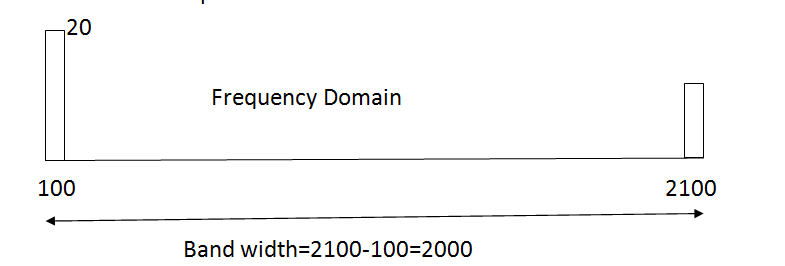
A periodic composite signal with a bandwidth of 2000 Hz is composed of two sine waves. The first one has a frequency of 100 Hz with a maximum amplitude of 20 V; the second one has a maximum amplitude of 5 V. Draw the bandwidth?

What is the bandwidth of a signal that can be decomposed into five sine waves with frequencies at 0, 20, 50, 100, and 200 Hz? All peak amplitudes are the same. Draw the bandwidth.

Given the following periods, calculate the corresponding frequencies:a)5 s    b)12 μs    c)220 ns

Given the following periods, calculate the corresponding frequencies:a)5 s b)12 μs c)220 ns

a)5 s
Solution:
         Given period=T=5s
         Frequency=f=1/Period(T)
                            f=1/5 Hz
                            f=0.2 Hz

b)12 μs
Solution:
     Given Period=T=12µs
      f=1/12 Hz
      f=83333 Hz
      f=83.333*103 Hz  
      f=83.333 KHz      

c)220 ns
Solution:
     Given Period=T=220ns
       f=1/220 Hz
       f=4550000 Hz
       f=4.55*106 Hz     
       f=4.55 MHz 
 Given the frequencies listed below, calculate the corresponding periods:  a) 24Hz, b) 8 MHz  c) 140 KHz

Given the frequencies listed below, calculate the corresponding periods: a) 24Hz, b) 8 MHz c) 140 KHz

a) 24Hz
Solution:
Given Freqency=f=24 Hz
Period(T)=1/frequency(f)
            T=1/24
            T=0.0417s
            T=41.7*10-3 s
                  T=41.7ms
            
b) 8 MHz
Solution:
Given Frequency=f=8 MHz
           T=1/f
          T=1/8
          T=0.000000125s
          T=0.125*10-6 s
          T=0.125µs

c) 140 KHz
Solution:
     Given Frequency=f=140 KHz
                   T=1/140
                   T=0.00000714s
                   T=7.14*10-6 s
                   T=7.14µs